

Pro Features Explained
If you are searching for the testo 558s manual, you usually want more than a PDF. You want to know what the tool actually does on the job, which features matter, and how the menus, display and app work together when you are standing in front of a live system. The official Australian product page does list both an instruction manual and a quickstart guide, but the bigger gap for most tradies is practical explanation.
That is where the 558s can feel a bit misunderstood. On paper, it looks like a premium digital manifold with a big screen and Bluetooth. In practice, it is more than that. Testo positions it around touchscreen operation, clear measurement graphs, guided measurement applications, wireless probe connectivity, app-based reporting, A2L and A3 compatibility, and robust IP54 protection. That is a lot of capability in one tool, and plenty of buyers never use all of it because nobody has walked them through the logic behind the features.
This guide fixes that. It is written as a manual-style explanation of the testo 558s features, not a hard-sell product page. We will look at the display, guided menus, refrigerant support, Bluetooth workflow and professional use in Australian conditions. If you want the wider background first, our Testo 558s overview is the best starting point before you dig into the detail here.

The short version is simple. The 558s is designed to reduce friction. It gives you a large colour touchscreen, keypad backup for gloves, clear graphs, all major measurement applications in one manifold, app support, and wireless integration with the wider refrigeration portfolio. That matters on busy days because faster setup, clearer readings and cleaner documentation can save more time than raw spec sheet bragging ever will.
So if you have been asking things like “how do the testo 558s guided menus actually help?”, “is the graphic display worth it?”, or “why choose the 558s over a simpler digital manifold?”, this article is built to answer those questions in plain English.
Graphic Display Advantages
The display is one of the clearest reasons the 558s feels like a pro tool rather than just a digital gauge. Testo describes it as a large colour display with intuitive touchscreen operation and clear measurement graphs. On the Australian page, the display type is listed as a capacitive touch display, and the product messaging keeps circling back to easier configuration, control and documentation through that screen.
That matters because a manifold screen is not just there to show numbers. It is the point where pressure, temperature, system status and trend information all come together. If the layout is cramped or unclear, you waste time double-checking yourself. With the 558s, Testo’s whole pitch is that the readings are easier to understand at a glance, including 30-minute trend curves displayed directly on the instrument. That gives the screen real job value, especially on diagnosis rather than just charging.
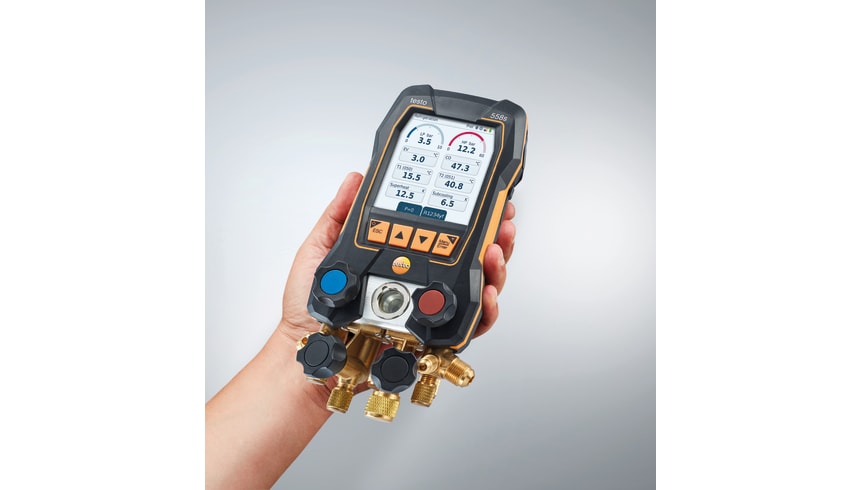
The graph side is worth calling out because it changes how you read a system. A number by itself tells you where you are. A graph starts to show movement and behaviour. Testo says the 558s can show clear measurement graphs and 30-minute trend curves, and the broader digital manifolds page adds that these curves support more reliable analysis. That means the testo 558s graphic display is not just about looking modern. It helps you spot instability, drift and small changes that are harder to understand from a fixed reading alone.
It also helps with pressure-temperature interpretation. The digital manifolds overview says all important parameters are visible at a glance, and that large colour display plus wireless probe connection makes quick assessment easier. For a fridgie on a rooftop or in a tight plant room, that matters because you do not always have the luxury of standing there and thinking quietly. Clear visual layout reduces hesitation.
Sunlight visibility is one of those things rarely discussed properly in brochures, but it matters a lot in Australia. The official pages stop short of making a big “sunlight mode” claim, but HVAC Shop’s local product description specifically highlights a high-contrast display that is easier to read under harsh sunlight. That lines up with the whole design logic of the large colour screen, even if the stronger language comes from retail copy rather than the manufacturer spec page.
There is also a professional presentation angle. A better display is not just easier for you. It can be easier to show a client, manager or apprentice what you are looking at. When readings, trends and measurement states are easier to see, it becomes simpler to explain what is happening and what you are doing next. That is a small thing until you are on a commercial call where confidence matters almost as much as the answer itself.
Tech Specs
Official Australian specs list the 558s display as a capacitive touch display, with clear measurement graphs, 30-minute trend curves, keypad backup, Bluetooth 5.0 and IP54 housing. The radio range is listed at 150 metres, and battery life is listed at up to 70 hours with backlighting and Bluetooth.
So if your question is whether the display is just a cosmetic upgrade, the answer is no. On the 558s, the display is one of the main reasons the tool works better as a daily diagnostic instrument.
Guided Menu Workflows
The next big feature is the guided menu system. This is where the 558s starts to separate itself from a simpler digital manifold. Testo says the manifold brings all measurement applications into one instrument thanks to wireless connection across the refrigeration portfolio, and the official kit pages repeatedly describe the setup as ready for superheating, subcooling, tightness testing, Delta T, evacuation and filling. That is really the core promise of the menu system: fewer steps in your head because the tool has already structured the task.
For many users, this is what they are really looking for when they search testo 558s manual features. They want to know how the instrument guides them. The answer is that the 558s is built to present the major refrigeration tasks as guided measurement workflows instead of expecting you to mentally stitch every step together yourself. That does not replace refrigeration knowledge. It reduces menu friction and lowers the chance of making a silly setup error when you are tired, rushed or interrupted.
Superheat and subcooling are the easiest examples. The wider Testo ecosystem and app materials emphasise measurement menus for applications such as superheating and subcooling, and the 558s product positioning keeps those tasks front and centre. In real use, that means the instrument and app are helping you structure the readings instead of leaving you to bounce between modes, probes and manual notes.
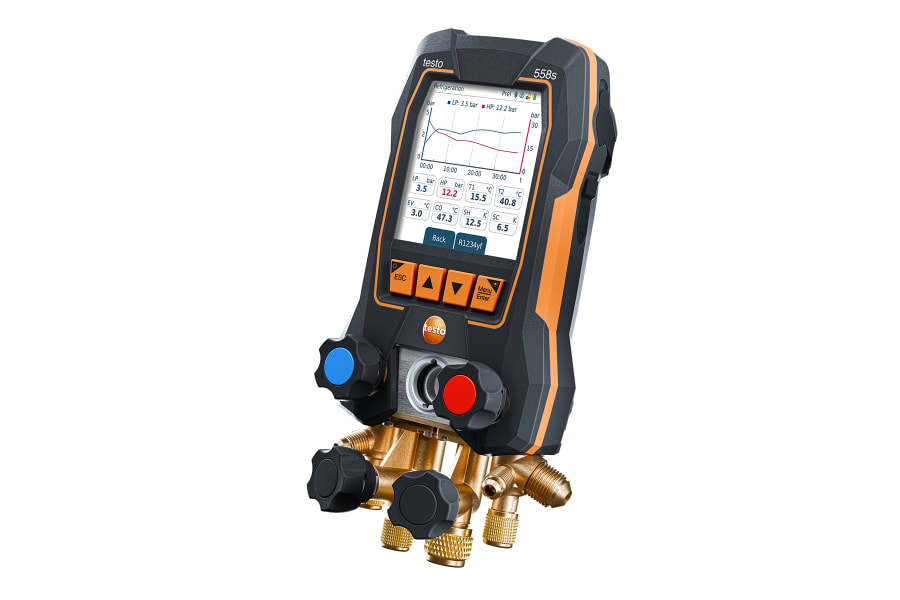
Evacuation monitoring is another strong example. The Australian kit page says evacuation can be controlled and documented via the manifold, and the kit page also calls out a graphic progression display of the evacuation measurement with indication of the start and differential value. That is much more useful than a bare number because evacuation quality is a process, not just a final reading. Good workflow makes that easier to judge.
Automated calculations matter for speed as well. Testo’s broader digital manifold messaging says digital manifolds make refrigeration, air conditioning and heat pump work easier and more efficient because all measurement data can be viewed centrally and the documentation is simplified. That is really what guided menus are doing: centralising the job so you are not manually juggling everything. On a straightforward split system, that saves minutes. On a more complicated commercial call, it can save mental bandwidth.
Another part of the guided menu story is confidence for newer staff. A senior tech does not need the tool to teach refrigeration. But even experienced people benefit from cleaner structure, especially on long days. Apprentices and less experienced techs benefit even more because the workflow is easier to follow. That is one reason the 558s can work well in teams where consistency matters, not just personal preference.
There is also a manual-versus-app question that comes up a lot. The 558s is not an “app only” tool. Testo is explicit that you can work via touchscreen, classic keypad operation, or the testo Smart App. So if you prefer handling key steps on the instrument itself and only using the app when needed, the tool supports that. If you like the app as a second screen or reporting tool, it supports that too. That flexibility is part of what makes the menu system feel professional instead of restrictive.
Pro Tip
Before the first live call, spend ten minutes in the workshop working through the 558s menu flow for superheat, evacuation and report export. The tool saves the most time when the operator already knows where the main programs live.
So when people ask whether the testo 558s guided menus are a gimmick, the honest answer is no. They are one of the key reasons the 558s works well as a day-to-day professional manifold.
558s Feature Comparison
The easiest way to make sense of the 558s feature set is to stop thinking about it as one big spec blob. It is better to break it into feature, benefit and application. That helps you work out whether a feature is genuinely useful on your kind of jobs or just something that looks impressive in a catalogue.
| Feature | Practical benefit | Where it matters most |
|---|---|---|
| Large graphic colour display | Easier reading, better trend visibility, cleaner explanation to clients or staff | Commercial diagnostics, rooftop work, poor-light plant rooms |
| Guided menus | Faster workflow, less setup friction, fewer avoidable menu mistakes | Commissioning, service work, mixed-system days |
| 96+ refrigerants stored | Broad coverage without constant switching or second-guessing | Mixed refrigerant work, modern HVAC/R service |
| Bluetooth 5.0 and wireless probe support | Cleaner setup, remote viewing, less clutter at the unit | Tight access, rooftop work, evacuation checks |
| App reporting and export | Faster site documentation and easier record handover | Commercial clients, maintenance records, team workflow |
| IP54 and hybrid charging | Better field durability and flexible power on long days | Australian outdoor work, dusty sites, longer service runs |
The point of this table is not to prove the 558s is for everyone. It is to show that the value sits in how the features work together. The display helps the menus. The menus help the readings. The app helps the documentation. The wireless probes help keep the whole workflow cleaner and safer around live equipment. That joined-up logic is the real reason the 558s feels advanced.
Multi-Refrigerant Support
Multi-refrigerant support is another major part of the 558s story. The official Australian page says the manifold stores 96+ refrigerants and allows frequently used refrigerants to be marked as favourites for quick retrieval. That is already well beyond the “60+” shorthand often used in comparisons, and it matters because refrigerant choice in the field is not getting simpler.
For Australian techs, the practical point is not just the number. It is the spread. A manifold with broad refrigerant support makes more sense when your week crosses residential air conditioning, light commercial service, heat pumps and refrigeration. In today’s market that usually means common work around gases like R32 and R410A, while some legacy service environments may still involve older refrigerants. The safest habit is to confirm the exact stored refrigerant list on the live instrument or current datasheet before site work if the application is unusual or older.

The A2L and A3 compatibility matters just as much as the list size. Testo repeats that point across the 558s product pages because it is central to the tool’s modern positioning. It means the manifold is intended to be ready for flammable refrigerant classes that now matter in real HVAC/R work, not just in future marketing talk.
Favourite refrigerants are a small feature with a big payoff. When you can mark the gases you use all the time, you waste less time scrolling and reduce the chance of choosing the wrong profile in a rush. That is exactly the kind of feature that sounds minor in a brochure but saves time every week once the tool becomes part of your normal van kit.
One point worth clarifying is “custom profiles”. The official current messaging is strongest on stored refrigerants, favourites, and over-the-air updates rather than on manual custom refrigerant creation on the tool itself. Testo specifically says OTA updates can add new refrigerants and enable connectivity to new products. So the safest interpretation is this: the platform is designed to stay current, but you should not assume manual custom profile building unless the live manual or current datasheet explicitly confirms it.
That is the right way to read the testo 558s multi-refrigerant feature. It is broad, modern and practical, but still worth confirming against the current live list when you are working outside the mainstream gases.
Bluetooth and App Integration
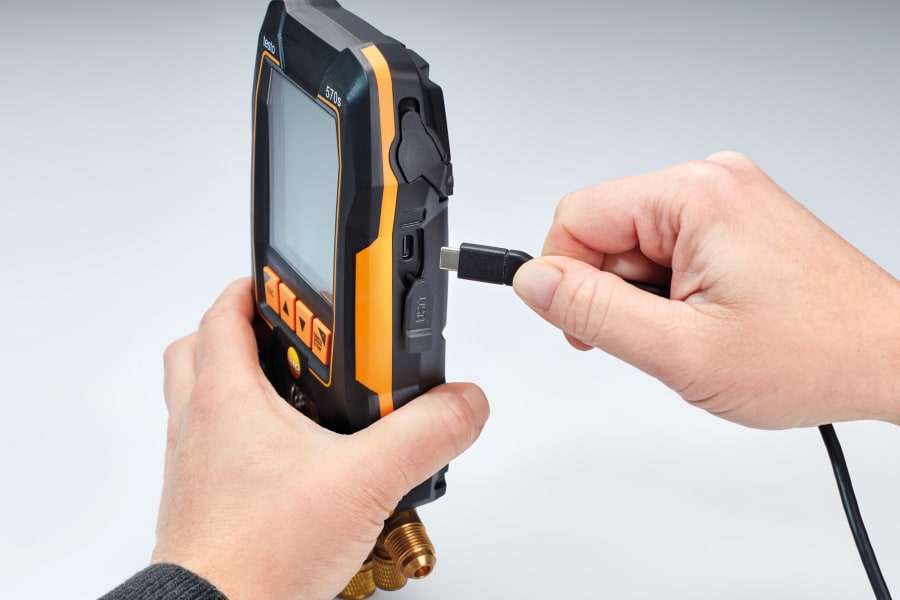
Bluetooth is not an add-on feature on the 558s. It is one of the main design ideas. The official spec lists Bluetooth 5.0 with a radio range of 150 metres, and the digital manifolds overview says all measurement data can be viewed centrally either on the manifold or in the testo Smart App. That means the instrument is built to work as part of a connected system, not as a standalone box that happens to talk to a phone.
This matters most when you start using wireless probes. The 558s is positioned as being wirelessly connected to the wider refrigeration portfolio, which lets one manifold body bring together temperatures, vacuum and other readings without crowding the work area with extra cables. On tight access work, rooftop units or awkward plant rooms, that cleaner layout is a genuine safety and workflow advantage.
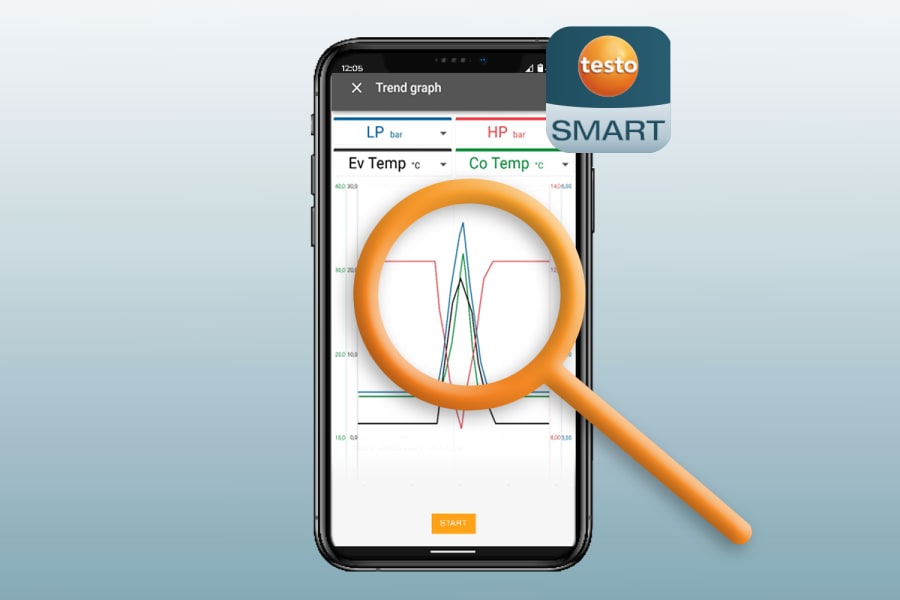
The testo 558s bluetooth story is also about flexibility. You can use the manifold screen directly, or use the app as a second screen and reporting tool. Testo’s Smart App pages describe the app as guiding measurements, showing all values at a glance, supporting intuitive menus, and allowing direct report dispatch. That means the app is useful not just for pairing, but for seeing, organising and sharing the result.
Reporting is one of the strongest practical reasons to use the app properly. The official Smart App material says you can create digital measurement reports, including PDF and CSV style export, and send them directly. The 558s product page also says readings can be exported and sent as a measurement report via the app so documentation can be completed on site in a few clicks. For commercial HVAC work, that is a meaningful feature rather than a novelty.
The app also supports what many tradies now expect from pro tools: second-screen use, live data at a glance, guided measurement menus and fewer paper notes floating around the van. If you are asking how the testo 558s app works, the simplest answer is that it extends the manifold rather than replacing it. You still have a strong on-tool workflow, but the phone or tablet gives you more room for visibility, reporting and organisation.
This is also where the 558s makes sense inside a bigger ecosystem. If you are building a broader connected workflow, the range of compatible wireless HVAC tools becomes relevant because the app logic and Bluetooth handling are part of a wider smart-measurement approach, not just a single manifold decision.
So the Bluetooth and app side of the 558s is not about novelty. It is about cleaner work, better visibility and faster reporting. That is why so many buyers looking at the manual end up really asking feature questions instead.
558s for Australian Professional Use
The 558s is clearly built for professional field use rather than occasional hobby work. Testo’s own digital manifold overview places these tools squarely in refrigeration, air conditioning and heat pump service, and the 558s product messaging keeps pointing to commissioning, servicing, diagnostics, evacuation and documentation. That already tells you the intended user.
For Australian contractors, the big question is not whether the 558s is “pro”. It is whether the feature set actually helps in local working conditions. In many cases, it does. The large screen helps in bright outdoor conditions. The keypad backup helps with gloves. The wireless setup reduces clutter at the unit. The IP54 housing gives better confidence around dust and splash exposure. The hybrid charging system helps when the day runs long and the van is not exactly organised.
Commercial HVAC and VRF-style diagnostic work are good examples. The 558s is not sold as a niche VRF-only tool, but its mix of display clarity, guided workflows, wireless probe integration and report export can make it a strong fit for more involved commercial service work. The value is not that it magically diagnoses systems for you. The value is that it reduces small points of friction across longer, more demanding jobs.
Australian weather matters too. Brisbane humidity, Sydney coastal glare and salt exposure, Melbourne cold snaps and dusty WA sites all punish tools differently. A manifold that is easier to read, easier to control with gloves, and more resistant to splash and dust is easier to live with across those conditions. That is not a glamorous buying reason, but it is often the most honest one.
Professional standards matter as well. A better manifold does not replace safe work practice, but it can support cleaner process, clearer reporting and better decision-making on site. That is why it makes sense to keep general Australian workplace safety guidance in mind when you are working around live plant, refrigerant service points and rooftop equipment.
Did You Know?
The 558s is officially listed with IP54 protection, up to 70 hours of battery life with backlighting and Bluetooth, and 150 metres of radio range. Those are not flashy brochure extras. They are exactly the kind of field details that change how comfortable the tool feels on real commercial jobs.
If you want context against the rest of the range, our comparisons of Testo 558s vs 557s features and Testo 558s vs 570s features can help. They show whether the 558s is the right balance between workflow and higher-end data features for your type of work.
And if your main concern is how the feature set lands as a complete field package rather than a standalone manifold, the complete 558s kit article is the best companion read because it explains what comes around the manifold and how that affects day-one usability.
Unlock Pro Features with 558s
The simplest way to understand the 558s is this: it is a professional manifold built to reduce friction. The display is clearer. The menus are more helpful. The refrigerant handling is broader. The Bluetooth workflow is cleaner. The app reporting is faster. None of that replaces refrigeration knowledge, but all of it can make a skilled tech more efficient.
If you came here looking for the testo 558s manual, the real takeaway is that the manual only tells part of the story. The bigger value sits in how the features work together on live jobs: graphic display, guided measurement programs, multi-refrigerant support, Bluetooth connectivity and on-site reporting. That is why the 558s has become such a strong option for tradies who want pro features without stepping into a more specialised logging-focused manifold.
If you want to see the current local product view, the Testo 558s manifold page is the next logical step. And if you are building a broader connected setup, the wider Testo professional tools collection helps show how the 558s sits inside the brand’s Australian HVAC workflow.
For buyers who already know the 558s is the right fit, you can review the local package and unlock pro features through the current product listing. If you want help confirming fit, setup or workflow for your type of work, contact us for a quote or talk to our team to confirm compatibility.