
Reviewed by: HVAC Shop Technical Team
Published: March 2026
Last reviewed: April 2026
The Connected HVAC Toolkit: How Fieldpiece Job Link Changes Real Service Work
If you have ever walked from the indoor unit back to the outdoor unit, then back to the gauges, then back again just to confirm one number, you already understand why wireless tools matter. The old way still works, but it burns time. It also creates more chances to miss a change, forget a reading, or make a rough call while the system is only just settling.
For Australian techs working in Brisbane humidity, on Sydney coastal rooftops, through Melbourne cold snaps, or on windy plant decks in Perth, that extra walking is not just annoying. It slows the whole job down. It also makes the diagnosis messier than it needs to be.
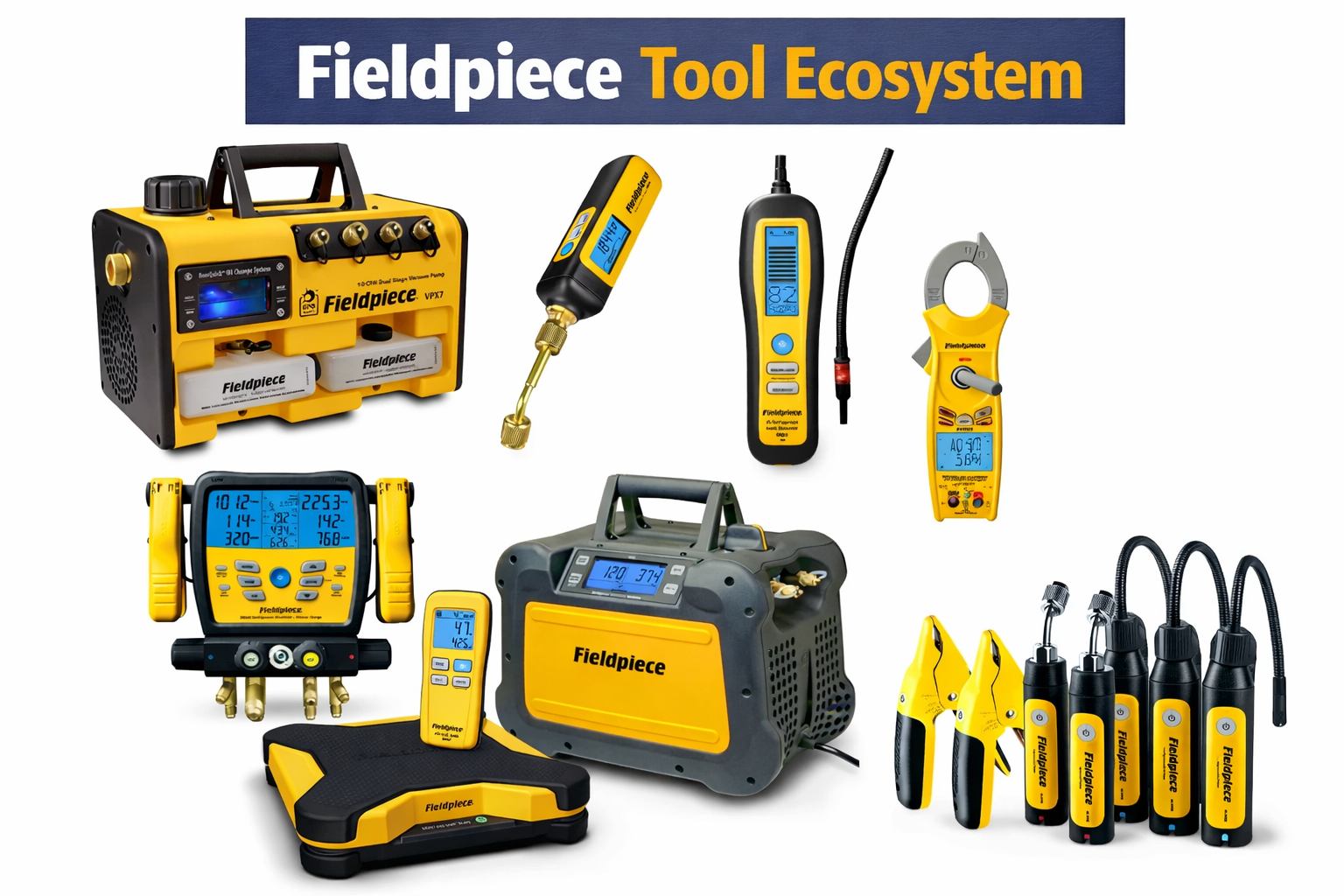
That is the problem Fieldpiece is trying to solve with its Job Link ecosystem. Instead of treating each tool like a separate island, the system links wireless probes, manifolds, scales, vacuum gauges, clamp meters, and the Job Link app into one working setup. The point is not “smart tools” just for the sake of it. The point is fewer wasted trips, better visibility, cleaner documentation, and faster decisions while you are still on site.
👉 If you want to see the current gear in one place first, start with the complete Fieldpiece range.
This guide is about Fieldpiece Job Link tools in the real world. We will look at how the Job Link system works, which tools matter most, how those tools connect to each other, what the app is actually useful for, how to build a kit without wasting money, and where Fieldpiece sits against the Testo ecosystem. If you want a broader starter read first, the Fieldpiece Job Link system overview is a good companion article, and the Fieldpiece Australia complete tool guide helps map the wider brand range.
For techs searching Fieldpiece wireless tools, Fieldpiece tool kit advice, or simply asking how Fieldpiece tools work together, the short answer is this: Job Link makes the most sense when you stop thinking in single tools and start thinking in system flow. That is what turns the ecosystem from a collection of gadgets into something genuinely useful on the job.
Wireless HVAC tools do not just save walking. They also reduce the chance of making decisions from half-settled readings, because you can leave the tool where it belongs and watch the data change properly from where you are working.
What the Fieldpiece Job Link System Actually Is
The Job Link system is Fieldpiece’s wireless measurement platform for HVACR. At its simplest level, Fieldpiece wireless tools send readings to the Job Link app and, in some cases, to compatible digital manifolds like the SM480V. That matters because HVAC diagnosis usually depends on several measurements at once, not one number taken in isolation.
Bluetooth connectivity is the backbone of the workflow. You place the tools where they need to be, leave them there, and read the live data on your phone, tablet, or compatible manifold instead of walking back to each point. That changes the feel of a service call immediately.
On a split system, it means you can stay where you are adjusting or observing the unit while still seeing pressures and temperatures. On a ducted or commercial job, it means you do not have to keep moving between indoor and outdoor sections just to confirm the same readings again. On rooftop work, it means fewer pointless steps in bad weather and less time crouched beside awkward access points.
The app side matters just as much as the hardware. Job Link is not only about viewing live numbers. It is also about data logging, professional reports, and keeping the job record cleaner. That is why the system appeals to business owners and service managers as much as individual tradies. It is not just measurement. It is measurement plus documentation.
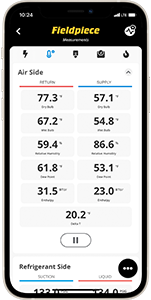
On the Australian mobile side, the practical takeaway is worth understanding. The local tool-to-phone connection is wireless, so weak mobile reception does not stop the actual readings themselves. In a black spot, you can still see local tool data. Internet matters more when you want to sync, share, or manage app-based job records beyond the phone or tablet in your hand.
That distinction matters on Australian jobs. Plenty of sites still have poor reception, weird plant-room coverage, or awkward access. The Fieldpiece wireless workflow is still useful because the measurement layer and the “internet sharing” layer are not the same thing.
Why Wireless Tools Matter More in Australia Than Many People Admit
There is a reason connected HVAC tools make sense here. Australian service work is not always calm, tidy, and controlled. Our climate and site conditions push everything harder.
Think about the common scenarios:
- Brisbane humidity making charge and airflow conditions slower to stabilise
- Sydney rooftops with coastal exposure, heat load, and tight access
- Melbourne systems behaving differently between frosty mornings and warmer afternoons
- Darwin and Townsville jobs where heat, moisture, and fatigue hit fast
- Commercial plant where walking back and forth wastes serious time
In those situations, a connected tool setup is not about looking modern. It is about reducing wasted movement and seeing the system properly while it is still doing what you need to observe.
That is the real reason wireless HVAC tools matter. They help you measure, verify, explain, and document without losing half the day to repeat checks.
The Job Link platform is built around wireless probes, compatible manifolds, app-based live measurements, and professional reporting. The big advantage is not one individual tool. It is the way the tools feed into one HVACR workflow instead of acting like isolated devices.
Job Link Compatible Tools: What Actually Matters Most
The easiest way to understand the Fieldpiece tool ecosystem is to start with the core pieces. Not every tech needs every wireless tool on day one, but once you understand the roles, the buying path becomes much clearer.
SM480V wireless manifold
The SM480V is the central refrigerant-side hub for many Fieldpiece users. It ties refrigerant-side measurements together and also works with other Job Link devices. If you want deeper context on the manifold itself, the Fieldpiece SM480V manifold comparison is a useful internal read.
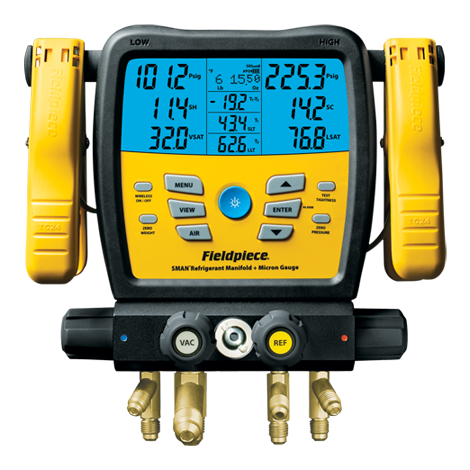
For many techs, this is the heart of the Job Link setup because it sits at the centre of charging, refrigerant-side diagnostics, and linked reporting.
JL3 probe kits
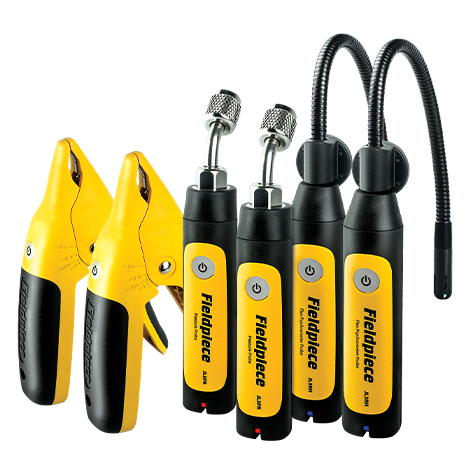
The JL3KH6 charge and air kit is where many people “get” Job Link for the first time. Pressure probes, pipe clamps, and psychrometers feeding live measurements into the app make the workflow feel cleaner immediately.

These tools are especially useful when you want multiple temperature and pressure points in one live view without constant repositioning.
MG44 wireless micron gauge
The MG44 handles evacuation properly at the system port. This is one of the best examples of “tools working together” in the Fieldpiece system. Instead of crouching by the pump and hoping that pump-side behaviour tells the full story, you can monitor vacuum progress where it matters.
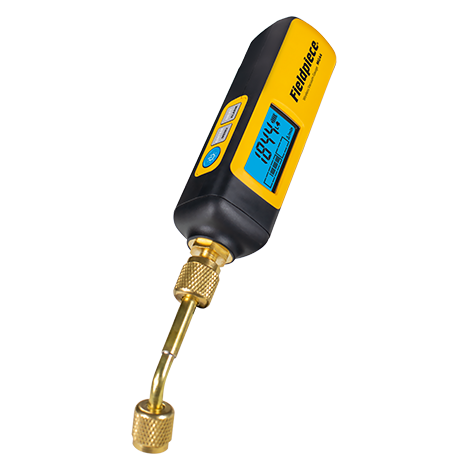
That is exactly the kind of practical gain wireless tools are supposed to deliver.
SR47 wireless refrigerant scale
The SR47 covers charging weight and links into the wider Job Link setup. This means you are not hovering over the cylinder every few minutes just to confirm how much has moved. On charging work, that is a genuine efficiency gain.
SC680 wireless clamp meter
On the electrical side, the wireless clamp in the ecosystem is the SC680. That is the clamp meter built specifically to send electrical measurements directly into the Job Link app. For some techs, it becomes the missing link between refrigerant-side workflow and electrical diagnosis.
If you want a simpler, non-wireless daily driver in the same brand, the SC440 clamp meter is still a very strong option, but the Job Link-native electrical tool is the SC680.
Supporting tools that still matter
Not every important Fieldpiece tool is itself a Job Link wireless device. The VPX7 vacuum pump and the MR45 recovery unit are good examples. They are not the Bluetooth side of the system, but they are part of the working kit many techs build around the wireless tools.
That matters because no app replaces proper evacuation or recovery gear. The ecosystem works best when the wireless tools sit on top of solid core tools, not instead of them.
How Fieldpiece Tools Work Together in Real Workflow
Fieldpiece tools work best when each tool does one job well and the app or manifold ties the data together. That is the difference between a useful system and a bag of random gadgets.
| Tool | Connects To | Primary Display | Main Benefit |
|---|---|---|---|
| SM480V manifold | Job Link app and compatible wireless tools | Manifold screen and app | Refrigerant-side hub for charging and diagnostics |
| JL3 probes | Job Link app | Phone or tablet | Fast multi-point readings without dragging tools around |
| MG44 micron gauge | Job Link app and SMAN manifold | Gauge, app, or manifold | Vacuum monitoring at the system port, not the pump |
| SR47 scale | Job Link app and compatible manifold | Remote, app, or manifold-linked workflow | Charge tracking without standing over the cylinder |
| SC680 clamp | Job Link app | Phone or tablet | Electrical diagnostics from awkward or closed-up locations |
The real benefit is not just that every number ends up on one screen. It is that the numbers make more sense together. You can charge with the manifold and scale talking to each other. You can watch evacuation on the MG44 at the system port. You can leave the clamp meter where it needs to be and still see the reading while adjusting something else.
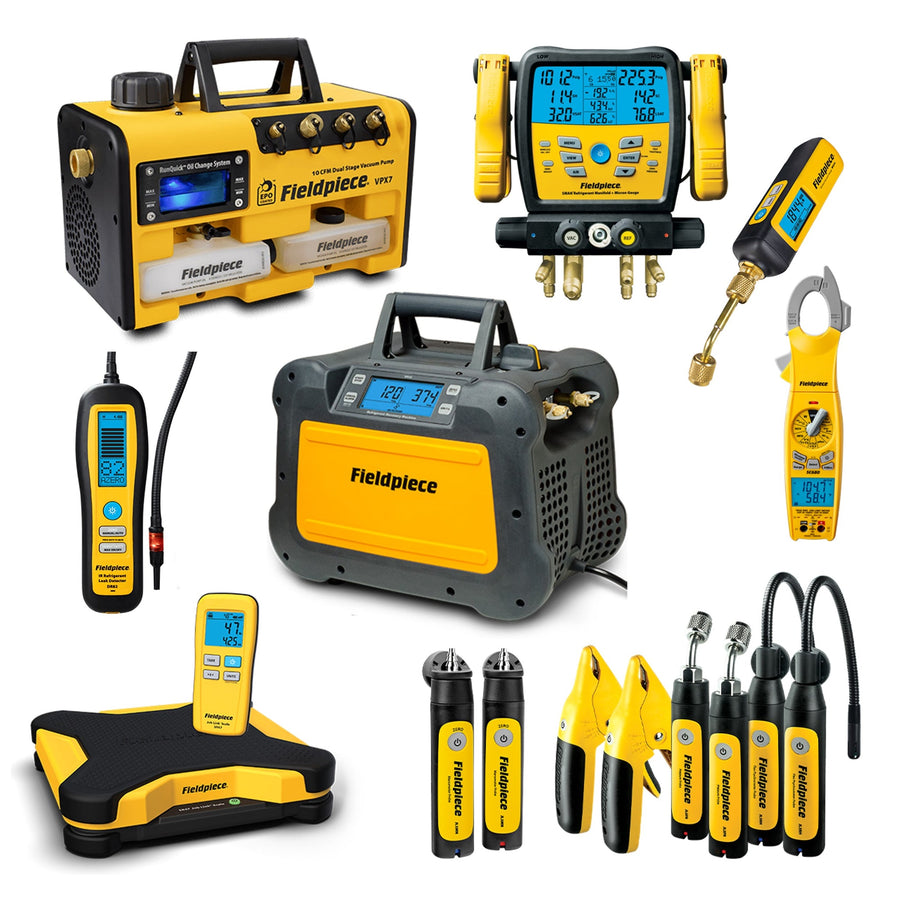
For Australian techs, that system view matters because jobs are rarely neat. You are often dealing with weather, access limits, customer interruptions, and difficult plant layouts all at once. A connected setup does not magically fix poor technique, but it reduces the wasted movement and lost context that slow good tradies down.
What the Job Link App Is Actually Good For
The app is where Fieldpiece turns a wireless reading into a full workflow tool. The best way to think about it is this: the hardware collects the live data, but the app is where that data becomes useful over the full job.
The first obvious benefit is live monitoring. You can view multiple readings from multiple locations at the same time. On a practical level, that means you stay where the adjustment happens instead of walking back to the tool every few minutes.
The second big benefit is reporting. This matters more than many tradies first think. A customer-ready report with before-and-after data lands far better than a rough verbal explanation and a couple of notebook numbers. It gives owners, facility managers, and office staff something real to review later.
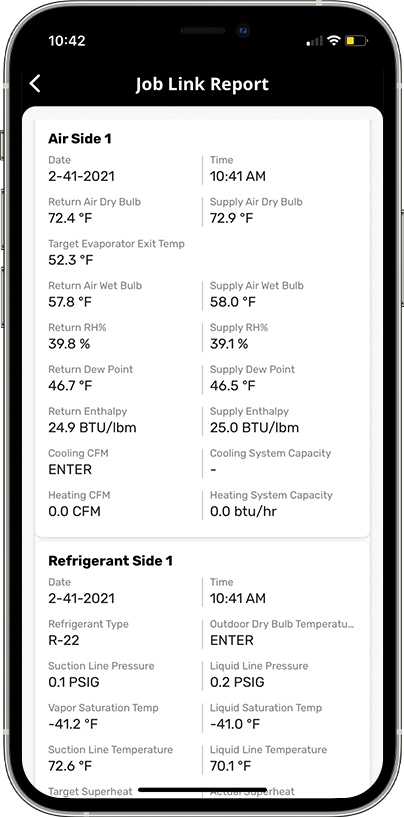
Then there is job history and organisation. The app helps sort work by customer, job, and location. That is useful for repeat clients, multi-site businesses, and service teams that want a cleaner record of what happened on a system last time.
Multiple probe support is another major advantage. One wireless reading is handy. Several live readings that work together are what actually make diagnostics stronger. That is when the app stops being “a nice extra” and starts becoming the place where the HVAC story makes sense.
It is also worth saying clearly that wireless convenience does not replace safe work practice. You still need proper procedure around electrical testing, live plant, and refrigerant work. For broader workplace safety expectations, Safe Work Australia is the one external compliance reference worth keeping in mind. Smart tools help, but they do not replace good site discipline.
Do not judge the Job Link app only by how the screen looks. Judge it by what it saves you: walking, repeated notes, missing data, and awkward customer handover conversations.
How to Build a Fieldpiece Job Link Kit Without Wasting Money
Building a Fieldpiece tool kit makes the most sense when you do it in stages. The smartest question is not “What is the cheapest way into wireless?” The smarter question is “Which addition removes the biggest time waste in my day?”
Stage 1: Start with the biggest bottleneck
For some techs, that means a manifold. For others, it means the JL3 probe kit. For others again, charging or evacuation is where the time loss happens, so the scale or micron gauge makes more sense first.
The key is not buying random gadgets. The key is buying the part of the system that solves your slowest repeated task.
Stage 2: Add the tools that complete the workflow
Once the first piece proves useful, the system starts to make more sense. This is usually where tradies add the MG44 for evacuation, the SR47 for charging, and then the electrical side if needed.
If you want a broader matched setup path, the Fieldpiece Advanced HVAC Kit gives a cleaner bundle view than trying to piece every item together from scratch.
Stage 3: Build the matched van setup
This is where premium kits make the most sense. The Fieldpiece Beast Mode kit is a strong example of a broader premium package, while the Fieldpiece R32 premium kit suits techs leaning harder into modern refrigerants and A2L-ready workflow.

The real return on investment is cumulative. Fewer wasted trips. Better before-and-after proof. Less scribbled paperwork. Fewer missed details. Stronger customer trust. That is how wireless efficiency pays off in real service work.
Fieldpiece vs Testo Ecosystems
The Fieldpiece vs Testo ecosystem question is fair because both brands now push connected HVAC workflows instead of purely standalone tools.
Testo has a real connected ecosystem too, with its own app-led workflow and Bluetooth measurement tools. Where Fieldpiece stands out is the HVACR-specific feel of the Job Link chain between probes, manifold, scale, vacuum gauge, and wireless clamp. It feels built around service and commissioning tasks from day one.
Where Testo often feels stronger is app guidance and broader measuring flexibility across multiple disciplines. Where Fieldpiece feels stronger is HVACR-specific chain-of-tools workflow.
| Comparison Point | Fieldpiece Job Link | Testo Smart Ecosystem |
|---|---|---|
| Core identity | HVACR-specific wireless tool chain | Broader connected measurement ecosystem |
| Refrigerant-side integration | Strong manifold, probes, vacuum gauge, and scale workflow | Strong manifold-and-probe workflow with app-led structure |
| Electrical integration | Wireless clamp sits inside same Job Link workflow | Less central to the overall HVAC ecosystem story |
| Reporting | Customer-ready reports tied directly to HVACR tools | Strong digital reporting and guided measurement programs |
| Australian buying path | Very clear through local matched kits and individual tools | More distributor-dependent depending on product path |
The best answer is not that one brand is universally better. It is that Fieldpiece currently offers a very clean, locally visible ecosystem path for Australian HVAC techs who want to standardise fast and build a clearly matched workflow.
Final Takeaway: Why the Fieldpiece Job Link System Is Worth a Serious Look
The best reason to go wireless with Fieldpiece is not fashion. It is workflow. The Job Link ecosystem reduces ladder trips, cuts repeated checking, improves job records, and lets you build a system where tools actually talk to each other instead of acting like strangers in the same tool bag.
For busy Australian HVAC techs, that can save real time on every call while also making the finished job easier to explain and defend.
The ecosystem also scales well. You can start with a manifold or probe kit, then add the MG44, SR47, and the electrical side as your workflow demands it. Or you can jump into the broader matched kits if you already know you want a proper system instead of a scattered tool pile.

If you are weighing whether the ecosystem is worth it, start with the part of your work that wastes the most time and build from there. That is usually the smartest way to invest in Fieldpiece Job Link tools.
👉 If you are ready to build a faster wireless workflow, browse the complete Fieldpiece ecosystem, compare the bundle paths through the advanced kit, the Beast Mode kit, or the R32 premium kit, and build a setup that actually suits the way you work.