
Building Smarter in Melbourne’s Fast Lane
If you’re a tradie working in Melbourne — whether you’re framing up a townhouse in Coburg, fine-tuning HVAC systems in Richmond, or doing a commercial fit-out in the CBD — you already know how tight the timelines can be. Every minute counts, and every mistake costs you time, money, and often a headache you didn’t need.
One of the easiest ways to lift your game? Syncing your Bluetooth smart tools with your tradie apps. It sounds like a small thing, but once you see your tools talking to your phone or tablet and auto-logging measurements, it’s hard to go back.
The old “pen-and-paper plus memory” method might’ve done the job ten years ago, but now? Melbourne job sites move too fast, clients expect instant updates, and compliance is tighter than ever. You need your tools and your data in sync — literally.

In this guide, we’ll cover:
- Why syncing your tools matters for Melbourne builders.
- How the process actually works (no tech degree required).
- Tips for choosing the right tools and apps.
- The best Bluetooth tools for Aussie tradies.
- Maintenance hacks to keep them running sweet.
- When it’s time to upgrade.
- A Melbourne builder’s real-world success story.
Why It Matters: The Melbourne Building Scene Is All About Speed and Accuracy
Melbourne’s building industry isn’t just busy — it’s relentless. Between multi-story apartments going up in Docklands, heritage restorations in Fitzroy, and luxury homes in Brighton, there’s a mix of old-school craftsmanship and new-school tech everywhere you look.
The pace is fast. One day you’re on a site with perfect Wi-Fi, the next you’re in a warehouse with barely a signal. That’s where Bluetooth smart tools shine — they keep your data flowing between tools and apps without relying on internet access.
The Cost of Old Methods
If you’re still taking a measurement on your laser, scribbling it on scrap timber, and hoping you copy it into your app later without a typo, you’re gambling with your time. All it takes is one wrong digit and suddenly the window frame doesn’t fit, or the ductwork is cut short.
The Compliance Factor
In Victoria, building compliance is no joke. Whether you’re working under a domestic building contract or on a commercial job, keeping a digital record of measurements can save you from disputes and keep inspectors happy.
How It Works: Syncing Bluetooth Tools with Tradie Apps (Made Simple)

If the words “Bluetooth integration” make your eyes glaze over, relax — it’s not complicated. Here’s the short version:
-
Power Up Your Tool
Make sure your Bluetooth tool (whether it’s a laser measurer, gauge, or torque wrench) is charged and switched on. -
Open Your Tradie App
This could be a dedicated manufacturer app or a broader project management tool that supports Bluetooth devices. -
Pair the Device
Just like connecting headphones, select your tool from the Bluetooth menu in the app. Pairing usually takes seconds. -
Take Measurements
Once paired, every reading you take sends data straight to your device. -
Auto-Save to Job Files
The app logs the measurement under the right project or task, so you don’t have to type a thing. -
Share or Sync
If you’re working with a crew, synced data can be shared instantly so everyone’s on the same page.
Aussie Tips & Buyer’s Guide: Getting the Right Setup in Melbourne
Choosing the right Bluetooth tool and app combo can save you hours each week. Here’s what to look for:
1. Check Weather Resistance
Melbourne’s weather is a mixed bag — you can get sun, rain, and hail all before lunch. Pick tools with a decent IP rating to handle sudden showers or dust.
2. Offline Capability
Plenty of Melbourne sites (and regional VIC jobs) have patchy reception. Make sure your app can store measurements offline and sync them later.
3. Battery Life
On an all-day site, you don’t want your smart tool dying after lunch. Check run-time and keep a backup battery or charger in the ute.
4. App Compatibility
Before you buy, check the manufacturer’s site to see which apps work with the tool. Some apps are trade-specific (HVAC, electrical, carpentry) while others are general.
Best Bluetooth Tools for Melbourne Tradies

Here are a few stand-outs that work brilliantly for builders, sparkies, HVAC techs, and more:
1. Bluetooth Laser Measurers
- Perfect for quick, accurate measurements on fit-outs, framing, or cabinetry.
- Sync directly to apps like MeasureON or Fieldwire.
2. Smart HVAC Gauges
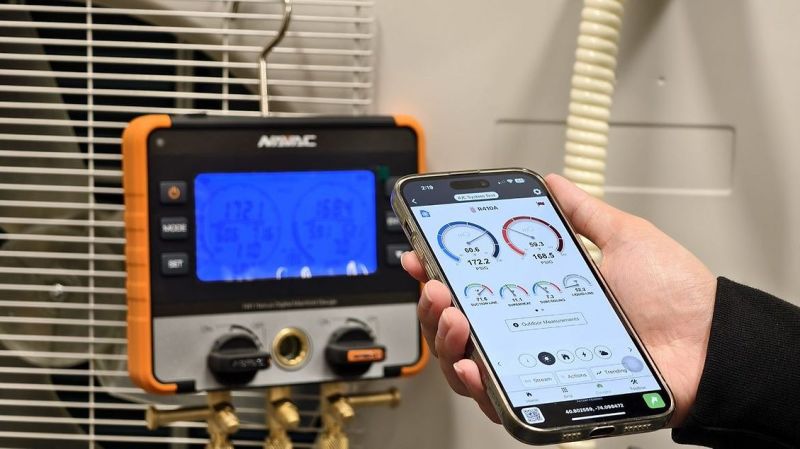
- For HVAC tradies, these save time by sending live pressure and temperature readings to your phone.
- Great for service reports and compliance logs.
3. Bluetooth Torque Wrenches
- Essential for mechanical work and certain structural installations where torque specs must be documented.
All of these tools are in our Bluetooth Smart Tools Collection with detailed specs.
Maintenance Must-Knows
- Firmware Updates — keep your tools’ software up to date for smooth app integration.
- Calibration — regular checks keep measurements accurate (especially for gauges and torque tools).
- Storage — Melbourne’s winters can be damp. Store tools in a dry case to protect electronics.
- Cleaning — Wipe down with a soft cloth after dusty jobs to keep Bluetooth sensors clear.
When to Upgrade
Signs you might need to step up to newer gear:
- Your current tool drops connection often.
- It’s not compatible with the latest apps.
- Battery life doesn’t last a full shift.
- Your work is expanding into new areas where Bluetooth integration would save you time.
Client Story: Tom’s Team in Southbank
Tom runs a small building crew in Southbank. Before upgrading, they were spending hours each week re-entering measurements into project files. Now, with Bluetooth laser measurers and HVAC gauges synced to their team app, data flows straight into their shared system.
“It’s been a game-changer,” Tom says. “We’ve cut down mistakes, sped up reporting, and the boys love not having to type everything in twice.”
Key Takeaways
- Syncing Bluetooth tools with tradie apps saves time and reduces errors.
- Choose tools with good IP ratings, battery life, and app compatibility.
- Melbourne weather and site conditions demand robust, reliable gear.
- Regular updates and calibration keep tools performing well.
- Upgrading can quickly pay for itself in efficiency gains.
Ready to save time, cut errors, and work smarter?
Check out our Bluetooth Smart Tools Collection — fast delivery across Melbourne and Australia-wide.
FAQs
Q: Do Bluetooth tools work with all tradie apps?
A: Not all, but most major brands support the big names in construction and trade apps. Always check compatibility before buying.
Q: How far can Bluetooth tools connect?
A: Usually up to 10–30 metres, depending on the tool and site conditions.
Q: Are they worth it for small jobs?
A: Absolutely — even on a quick job, auto-logging saves time and prevents mistakes.
Q: Can I use them offline?
A: Yes, most apps store data locally and sync when you’re back online.
Q: How secure is my data?
A: Most apps encrypt your data; just make sure you’re using updated software.
Q: What’s the lifespan of a Bluetooth tool?
A: With proper care, several years. Battery replacement can extend life.
Q: Do they work in wet or dusty environments?
A: Many do — look for a high IP rating for protection.